Do you remember that I talked about the change of the bank in Estonia? This article is the third chapter (?) of it. (There will be four chapters in total.) This time I will develop the text regarding how to set the language on SEB’s account page, activation of SEB’s debit card as well as SEB’s mobile app.
★How to set the language on SEB’s account page
To begin with, the UI of SEB’s account page is not that user-friendly. In terms of the UI side, Swedbank has the better platform in my opinion. This is because on Swedbank’s website, you can change the language on both the public web page and your account page, and because you can change the language to English immediately from a language gateway on the top of the page.
But SEB is different!
I was so flustered.
Because I thought I might not have had English after changing the bank.
So I asked on the help chat and the support explained, but I thought:
Wait, even if you explained in English, I still cannot change it as the website is in Estonian.
Then,
I asked how it was in Estonian, and they told me – that there is indeed English on SEB’s account page. The texts below are how to change the language on SEB’s account page.
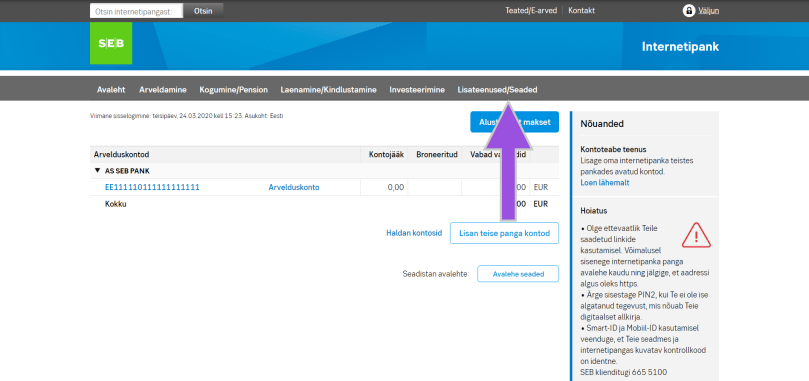
First of all, you will see the screen like the image below after logging in SEB’s account page, and click “Lisateenused/Seaded” (indicated by the arrow).
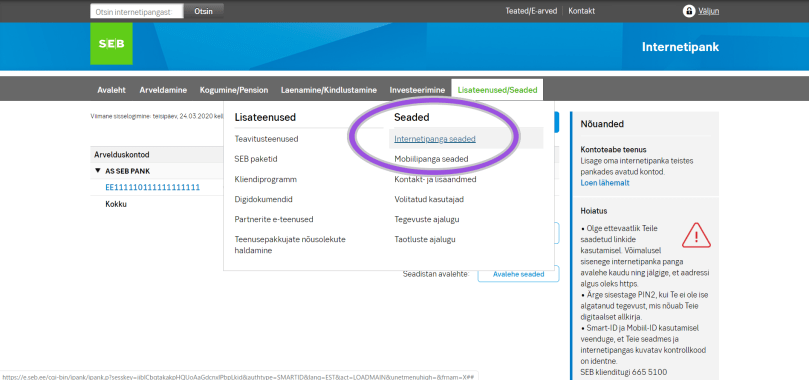
Next, there are some options shown, so click “Internetipanga seaded” (indicated by the circle).
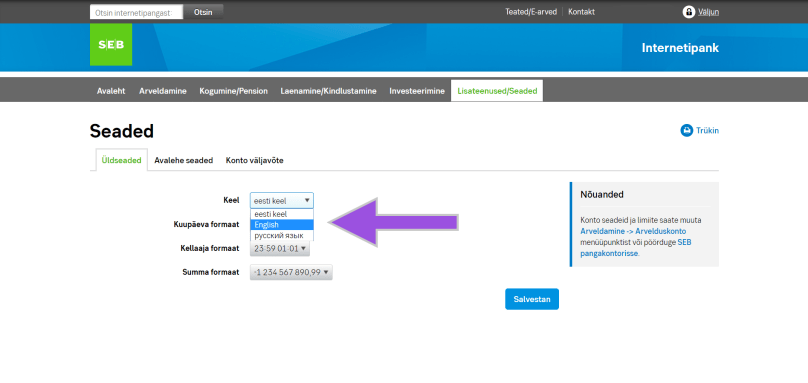
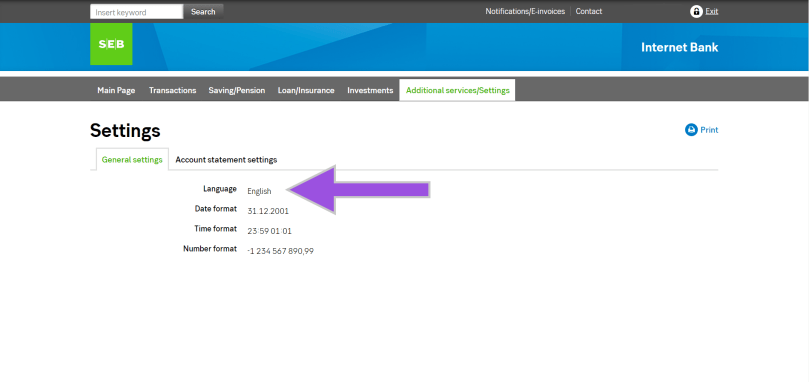
Moreover, you will see the drop-down list beside “Keel”, so select your language preference and save it. Once you saved the change, you will see the entire account page in English (if you chose English), and the language option also says “English”.
That’s it.
Congratulations! Now you completed the language setting on SEB’s account page.
★Activate the SEB card
Furthermore, let’s activate the card that you have got from SEB. Apparently it’s easier to do it after the language setting.
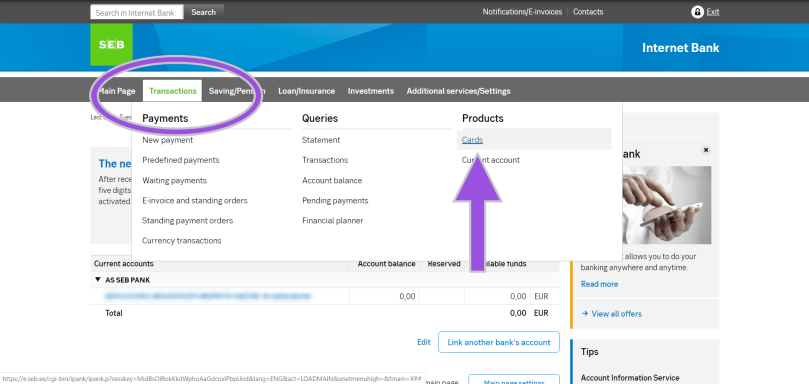
Firstly select “Cards” from the “Transaction” (indicated by the circle) on the account page.
Then you will see the type of cards that you have, so click “Activate the card” and follow the instruction on the screen.
THAT IS ALL!
However, you should keep in mind that the PIN code is initially something that you can see on the screen. You cannot change the PIN code on the online banking, but no worries, you can change it at the ATM so just find the nearest SEB’s ATM.
★SEB’s mobile app
In addition to the procedures above, you might want to manage your assets from the mobile device. Of course SEB has its mobile app, but on iOS you need to set the app store Estonia first. Otherwise you cannot download the app. (Perhaps on Google Play as well but you cannot change the store again on Google Play until next year, so be careful.)
I changed the app store from Japan to Estonia, and actually nothing big has happened basically. (In more detail, as of the beginning of May 2020, I couldn’t download the apps of xID which is a Japanese version of Smart-ID and Brain Focus which is a pomodoro timer in the app store Estonia.)
Anyways, I have set something necessary and fundamental on SEB’s account page. You might be wondering why the post date of this article is the end of March is simply because I did the first two things in this article (the language setting and the card activation) on that date. As for on SEB’s app and the app store, I have another story later on.
In 2017 when I came to Estonia for the first time, I opened a bank account on Swedbank in Estonia. I wanted to choose LHV or SEB, but it costs 200€ to 250€ to open a bank account in Estonia unless you have a strong connection with Estonia. (The price varies depending on the bank.)
As I wrote in the article two years ago (in Japanese), I was a student at that time so I had two conditions for the bank that: 1. could issue an ISIC card; 2. and did not require me to pay to open a bank account.
It was the very beginning of my arrival in Estonia so of course I didn’t have a TRP card and the proof of the enrollment of the university didn’t seem to be enough effective to open a bank account in Estonia according to any banks’ websites.
Considering those conditions above, Swedbank was the only option that I could open the bank account. (At that time TLU had a partnership with Swedbank and LHV which did not offer the ISIC card.) I was okay with Swedbank when I was a student but now my purpose to stay in Estonia is to work, whose situation is different from being a student.
It is normal in Europe but in Japan you don’t have to pay for loos and rarely have to pay for the monthly fee of bank cards including some credit cards. I came to feel that it was ludicrous to spend such a small fee every month so I had wanted to change the bank. (You have to pay 1.28€ for the monthly fee of Swedbank’s regular debit card.)
Then I finally changed the bank recently, which is SEB. I will write an article separately afterwards why I chose SEB. This time the topic is about what you need to do when you want to change the bank itself in Estonia.
You may think “Why don’t you just keep two bank accounts in Estonia?” Personally I’ve already had another bank account in euro on N26 so I thought it would be rather hard to manage the bank accounts. This is why I thought one bank account in Estonia is enough and why I say “change a bank account”.
In order to change the bank account, the following is a bigger picture of the procedure. (However you should bear in mind that this is my case so you need to be flexible depending on your needs.)
Open a bank account on SEB ↓ Transfer the money on Swedbank to SEB ↓ Tell my boss (or the accountant in your case) the newer bank account number (which starts with EE in the case of the Estonian bank) ↓ Close the bank account on Swedbank ↓ Use the bank account on SEB as a main one
— Something like this. I said that two bank accounts for the euro currency were enough, and yet I actually have four bank accounts in Japan 😛 (This is because the available banks are different in urban areas and countrysides.)
2) You can open the bank account on SEB online (Unrecommended)
Secondly, this is the very first step for you to change the bank in Estonia:open the bank account. On SEB, you don’t have to go to the bank to open the bank account, which is unrecommended as in the chapter title. This is because
it may take more time for you.
On SEB’s website you can make an appointment for the video meeting, but it doesn’t mean you will immediately get the assisting email about the video meeting from SEB.
First of all, they will ring you.
On the phone they will ask:
Why you want to open the bank account; What connection you have with Estonia.
These are common questions for the immigrants as opening a bank account in Estonia. In addition to this, the caller asked me to send them some documents by email:
Copy of the passport
Copy of the TRP card
Digitally signed work contract
Bank statement of the previous bank (which is Swedbank in my case) for six months(, which should be necessary if you want to change the bank in Estonia.)
Then the caller said:
But you might not be able to have one on SEB because you already have on Swedbank.
Would it be possible?
I’m still not sure if it was something like a threatening because I’m an immigrant or she was merely a new worker, but I have never heard such a case and according to my Hong Kong flatmate his Egyptian friend who is a student in Estonia already had two bank accounts in Estonia so it should be possible.
Our conclusion is
it’s better and faster to go to the bank.
★ To the branch bank of SEB
For the reason above I went to the branch bank of SEB!
I brought:
My passport
My TRP card
The bank statement of Swedbank with the bank’s signature that I sent to my own email (*)
Usually in Estonia bigger banks open until seven in the evening (the banks are open until three in the afternoon in Japan no matter how big or small they are), and yet I did in the end of March 2020, which means the situation was hectic owing to COIVD-19. I don’t know if it was because of COVID-19 or merely because it was Tuesday afternoon in the end of March, but the inside was super empty.
I just took the waiting number and waited for my turn for five minutes or so.
The SEB bank teller didn’t seem to be capable of speaking English fluently as he was a Russian speaker, but his service was quite good. I told him that I already had one bank account on Swedbank, and he asked me to send them an email with the previous bank’s statement with the bank’s signature, so I just sent what I sent to me, keeping the file attached to info@seb.ee.
Then the bank teller will do this and that.
It would take approximately 40 to 45 minutes. If this was done by the video meeting, it would take one day for the call, one day to get the necessary documents and for documentation and one more week or so to get investigated. Considering these steps, I would recommend you to go to the branch bank unless you live in the hyper countryside of Estonia.
(*I will write an article about how to get the bank statement on Swedbank someday. No worries, it’s not that complicated.)
By the way I often saw some message like “You save XX pages” on the SEB’s tablet on the desk. I was actually suspicious but the total amount of documents that I got in the end was
2.
Very few!!
I was really impressed in a way.
When I was about to leave the branch bank, bank teller told me that I would get the debit card in six business days or something, so all I needed was just to wait.
3) Reception of SEB’s debit card
I expected I would get the debit card in the coming week considering the business days but I received it on Saturday.
It was faster than I thought. (Or maybe normal but my expectation was too low.)
Once you’ve got a new debit card, you need to activate it online. You can go to the branch bank but they charge you. They believe that everyone can do it online.
You may get insecure due to this way of writing, but actually it’s super easy, so no worries. I rather think it difficult to change the language setting on the SEB’s website, because of which I will write it in a different article separately. (Again.)
By the way, the photo is edited and hides the important information, so it’s hard to see but the card is totally flat. This is said to be more secure because you cannot read the numbers by touching card.
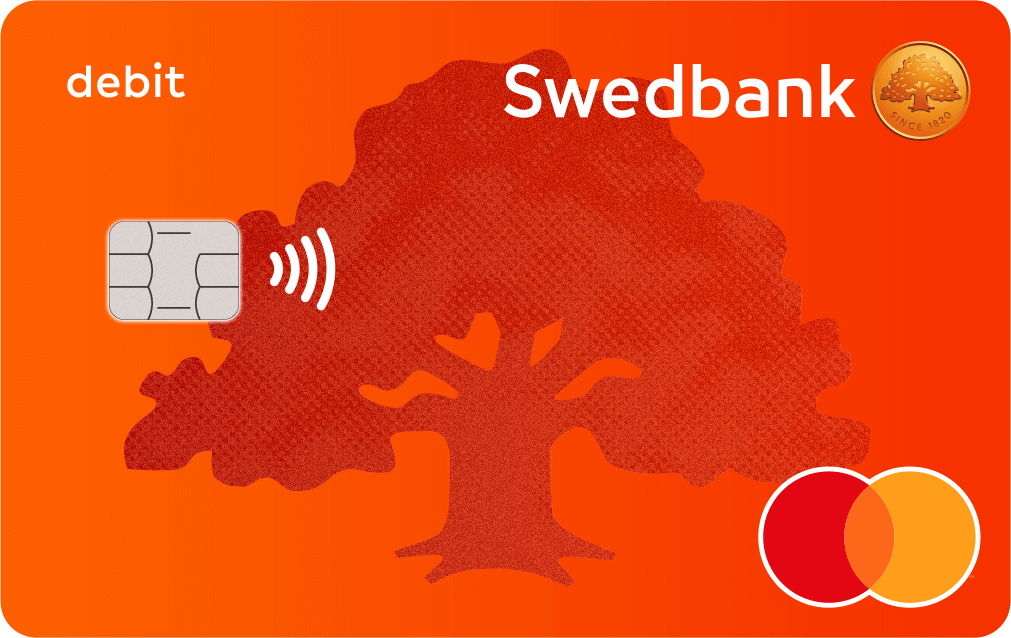
In terms of the card design, however, I prefer Swedbank. It had tiny glitters on the bank card, which looked more gorgeous than SEB’s default debit card that freaking looks like the Tallinn transport card. (I also will write about the card design in the near future as I’m planning to change it, so I’m pretty happy with the fact that I could open the new bank account in Estonia.)
4) Close the bank account on Swedbank
After opening the bank account on SEB and getting the new bank card, the next step is to transfer money to SEB’s bank account from the previous bank account (which was on Swedbank in my case). Then I have to tell my boss (or an accountant in your case) that I have changed the bank account, and finally I can close the bank account on Swedbank (in my case).
In the case of Swedbank, you are required to ring or email the bank to close the bank account. I will, again, write about it in addition to how to produce the bank statement on Swedbank soon.








 zooks.ee