Do you remember that I talked about the change of the bank in Estonia? This article is the third chapter (?) of it. (There will be four chapters in total.) This time I will develop the text regarding how to set the language on SEB’s account page, activation of SEB’s debit card as well as SEB’s mobile app.
★How to set the language on SEB’s account page
To begin with, the UI of SEB’s account page is not that user-friendly. In terms of the UI side, Swedbank has the better platform in my opinion. This is because on Swedbank’s website, you can change the language on both the public web page and your account page, and because you can change the language to English immediately from a language gateway on the top of the page.
But SEB is different!
I was so flustered.
Because I thought I might not have had English after changing the bank.
So I asked on the help chat and the support explained, but I thought:
Wait, even if you explained in English, I still cannot change it as the website is in Estonian.
Then,
I asked how it was in Estonian, and they told me – that there is indeed English on SEB’s account page. The texts below are how to change the language on SEB’s account page.
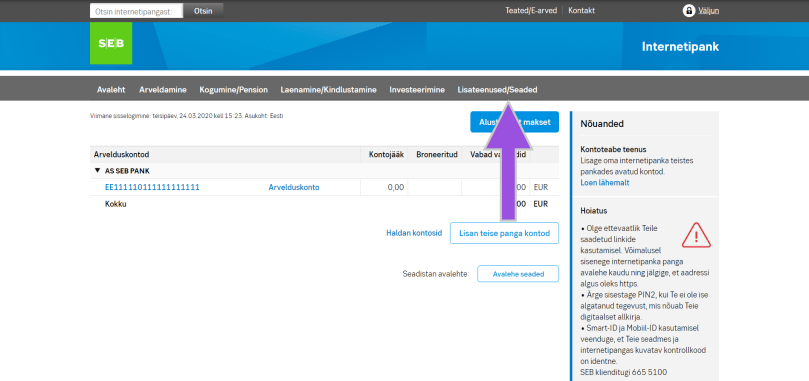
First of all, you will see the screen like the image below after logging in SEB’s account page, and click “Lisateenused/Seaded” (indicated by the arrow).
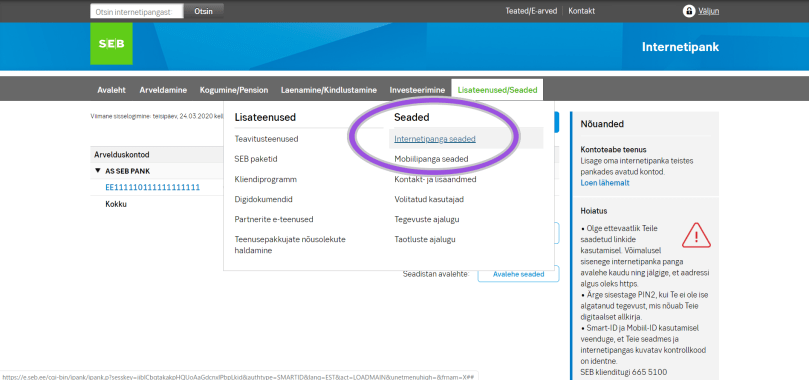
Next, there are some options shown, so click “Internetipanga seaded” (indicated by the circle).
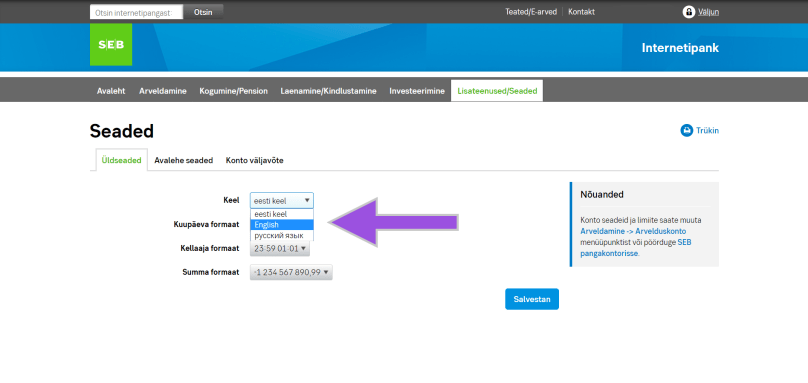
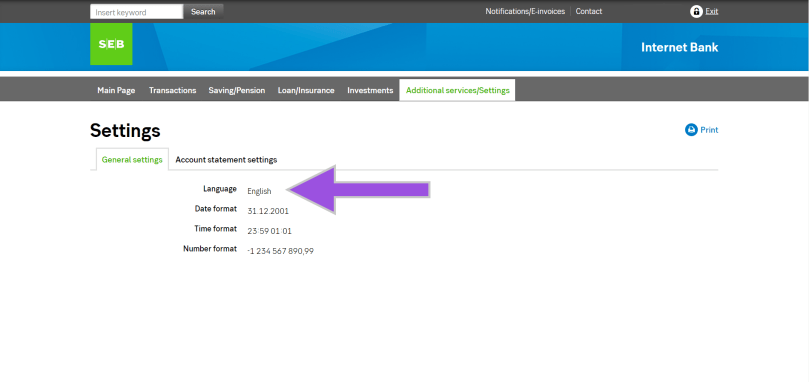
Moreover, you will see the drop-down list beside “Keel”, so select your language preference and save it. Once you saved the change, you will see the entire account page in English (if you chose English), and the language option also says “English”.
That’s it.
Congratulations! Now you completed the language setting on SEB’s account page.
★Activate the SEB card
Furthermore, let’s activate the card that you have got from SEB. Apparently it’s easier to do it after the language setting.
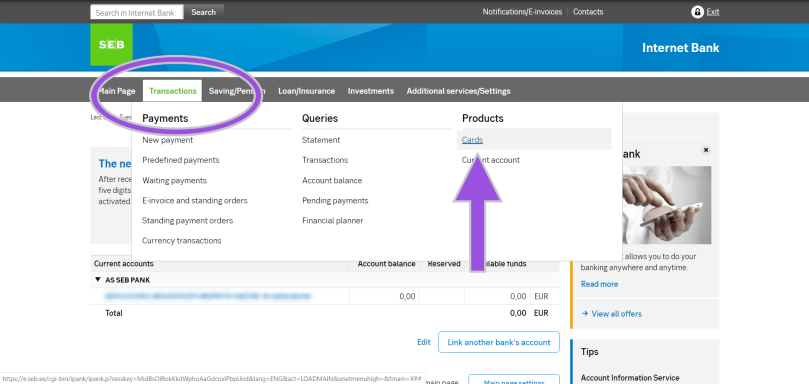
Firstly select “Cards” from the “Transaction” (indicated by the circle) on the account page.
Then you will see the type of cards that you have, so click “Activate the card” and follow the instruction on the screen.
THAT IS ALL!
However, you should keep in mind that the PIN code is initially something that you can see on the screen. You cannot change the PIN code on the online banking, but no worries, you can change it at the ATM so just find the nearest SEB’s ATM.
★SEB’s mobile app
In addition to the procedures above, you might want to manage your assets from the mobile device. Of course SEB has its mobile app, but on iOS you need to set the app store Estonia first. Otherwise you cannot download the app. (Perhaps on Google Play as well but you cannot change the store again on Google Play until next year, so be careful.)
I changed the app store from Japan to Estonia, and actually nothing big has happened basically. (In more detail, as of the beginning of May 2020, I couldn’t download the apps of xID which is a Japanese version of Smart-ID and Brain Focus which is a pomodoro timer in the app store Estonia.)
Anyways, I have set something necessary and fundamental on SEB’s account page. You might be wondering why the post date of this article is the end of March is simply because I did the first two things in this article (the language setting and the card activation) on that date. As for on SEB’s app and the app store, I have another story later on.
Previously I talked about how to change the booking on Flixbus. As mentioned there, I planed to ride on Flixbus day after the day that I was supposed to attend the concert in Stockholm, Sweden from the nearest bus stop of the hostel to Stockholm Arlanda airport.
However, COVID-19 made the concert postponed, accordingly to which I had to change the flights and the booking dates of the hostel. The last necessary change was the booking on Flixbus. Then I changed the date of the ride on Flixbus. Strictly speaking, as also described in the article, they treated my ticket as cancellation and then gave me a voucher code valid for one year.
It’ll be implemented in August so I still haven’t “rebook” the ride on Flixbus as of today (22/March) but anyways everything was alright because I could change the rest of the necessary steps. Moreover, when COVID-19 made whole Europe in panic, I summarised my personal news in another article, I said that I was supposed to travel in some countries after travelling Sweden.
Thus, there have been subsequent cancellations and changes of flights and bookings of accommodations since COVID-19 affected all the plans in March. This time I summarise how to ask for help and change flights on Ryanair that I was supposed to use after travelling in Sweden.
Ryanair’s help centre has a chat support, which is open at 6am (GMT) but I couldn’t connect any agents for a while even though I accessed the website at 6am (8am in Estonia), which is probably because of every government’s announcement and subsequent cancellations of flights by COVID-19.
For the reason above, I tried to access Ryanair’s help centre on Friday afternoon, 13th of March again. Ryanair’s help centre is similar to Flixbus, which makes the customers to solve the problems by themselves first but perhaps many of you would miss or lose yourself on Ryanair’s website.
1) Search anyways
As mentioned you might miss Ryanair’s help centre so let’s go to the website anyways. If you don’t go, nothing will start. (Obviously.)
2) Contact them!
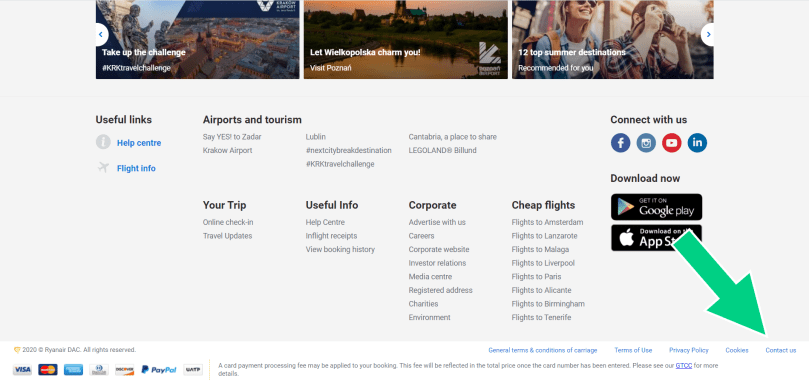
Once you accessed Ryanair’s website, scroll down the screen. Then you’ll see “Contact us” in really teeny-tiny letters so click it.
3) “Let’s chat”
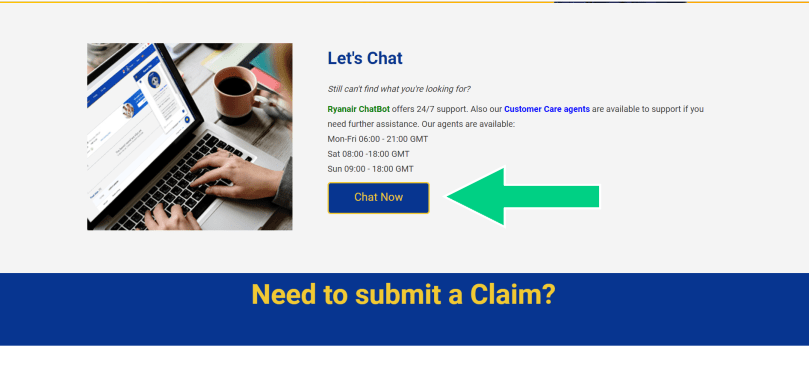
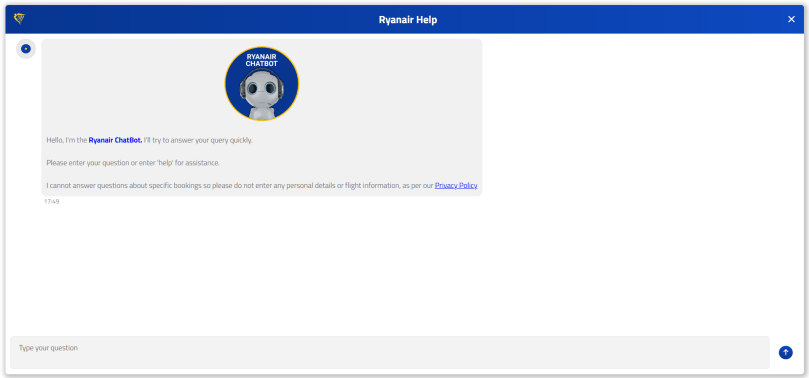
After clicking it, you will see the button “Chat Now” in the section of “Let’s chat” so click it. If you read the description properly, you will understand; it does not mean that you will be connected with the agents immediately after “starting” the chat.
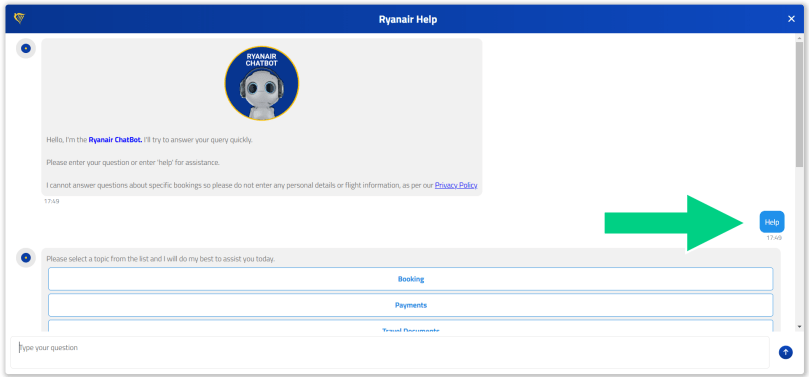
The chat bot will answer you so let’s try if it can solve your problem by entering some word or asking questions. Given that chat bot is meaningless even after entering the word or nothing happens, type “Help”.
4) Need a human support?
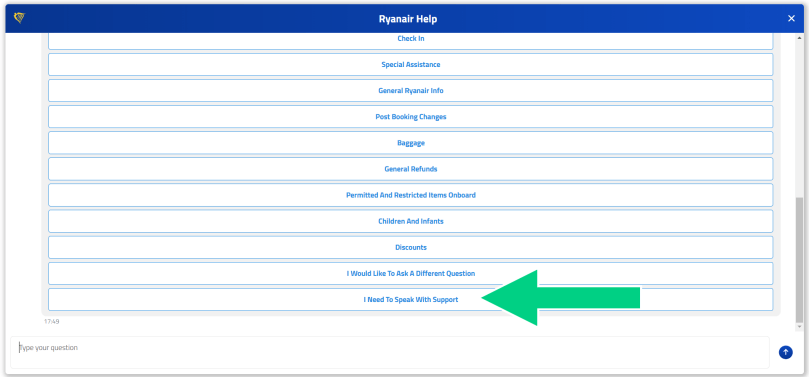
Once you entered “Help” in Ryanair’s chat bot, it shows multiple options for you so try and find the most suitable one for your need. If you couldn’t find any help there, scroll down the chat and select ”I Need To Speak with Support”.
5) Be patient
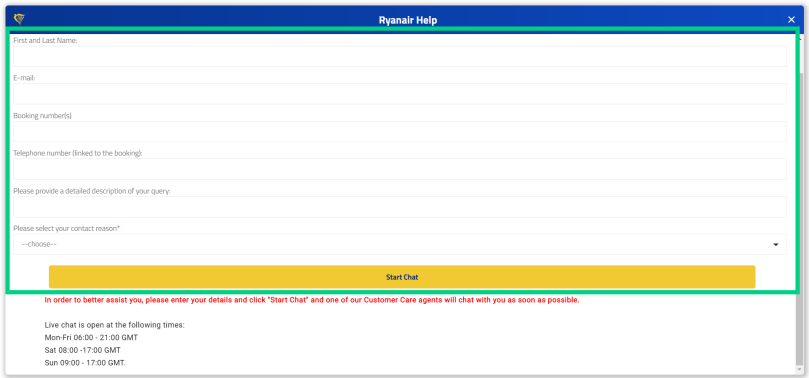
After selecting it, you will be required to enter some necessary information and then added to the support “queue”. In comparison to Flixbus, you don’t know how many people are queueing in front of you on Ryanair. Therefore, I couldn’t make any progress even though I spent the whole morning and didn’t know the situation at all.
However, I successfully could get connected with some agent in the afternoon so I asked them, who said that they charge all the passengers in case we wanted to cancel or change the flights as usual because there was no change in terms of the flights to and from Germany as of the afternoon on the 13th.
On the other hand, British Airwaysalready announced that they cancelled or would do something for the flights to and from Germany as of then but Ryanair cancelled flights a few countries including Italy.
(By the way you can access Ryanair’s help centre mentioned above from here.)
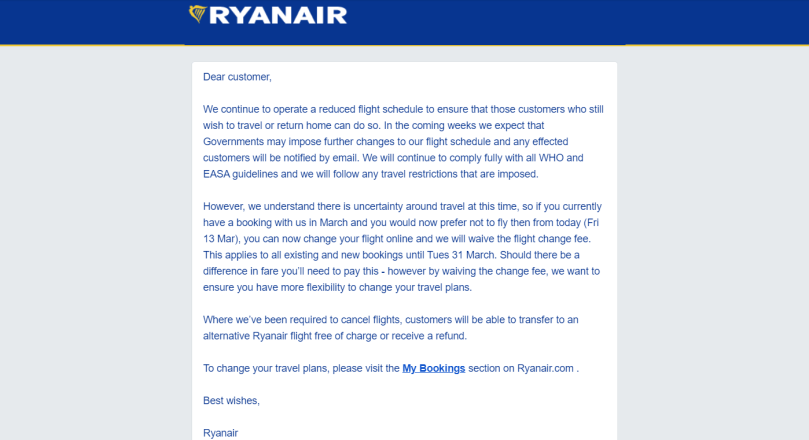
Next day, Saturday, on the 14th of March, I got an email from Ryanair, where they would not charge the passengers in March for changing the flights without any changing fee. In case the alternative tickets that the passengers would choose are more expensive the ones that they had, they needed to pay for the differences.
Therefore, the next section is about how to change the flights on Ryanair.
★ How to change the flights on Ryanair
Once you’ve decided to change the flights on Ryanair, go to Ryanair’s website and log in so as to change the flights. (On Ryanair’s website you also may choose Facebook or Google to log in.)
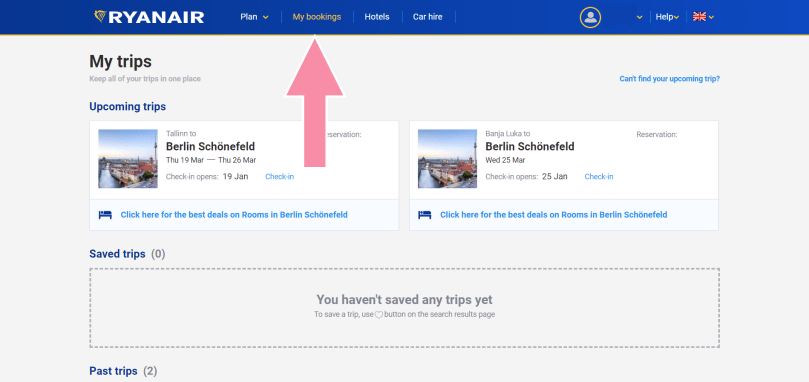
1) Open My Bookings
After logging in, the screen already should be My Bookings, which is correct. It’s like the image above and if it shows your flights, everything is alright.
2) Choose flight to change from “Upcoming trips”
On the top of My Bookings you see your flights as “Upcoming flights”. If you click the flight that you want to change, you will go next.
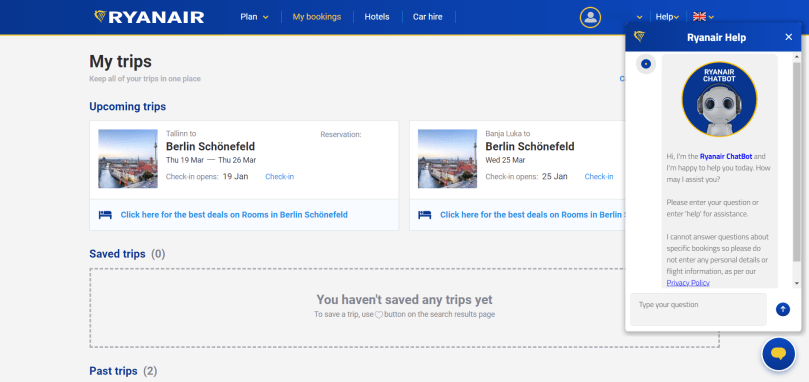
Once you logged in, you also can easily ask the chat bot for help.
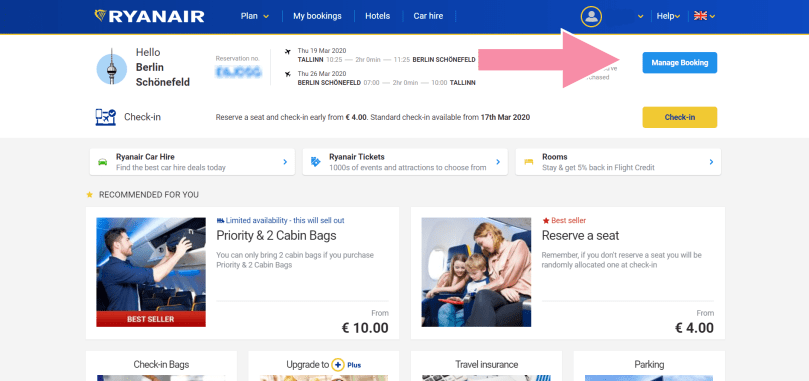
3) Change the booking
I selected the flight from Tallinn to Berlin here because I had three flights and two trips in total. To change your flight booking, click “Manage Booking” on the top right corner of the screen.
4) Change the itinerary itself
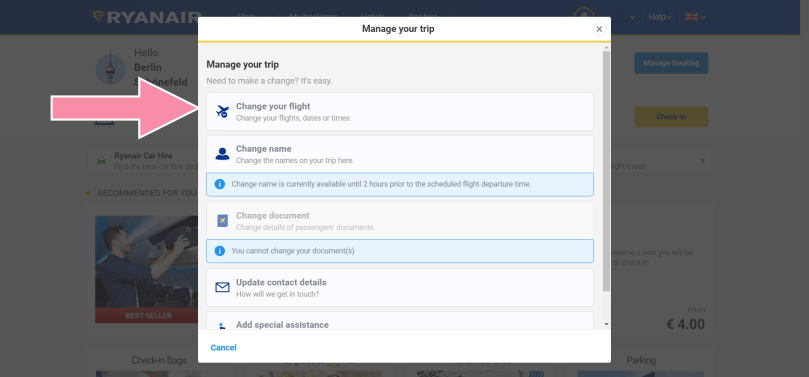
If you click “Manage Booking”, you will see the options that you can make changes with so select “Change your flight”.
5) Choose the flight/s
I bought a round trip ticket for Tallinn and Berlin so here it shows two tick boxes for each so that I could make changes for each flight. I ticked both boxes since I wanted to have all the flights in March in summer but in case you want to change one of the flights of the round trip, you can tick just one of them. After that, click “Select” and go next.
6) Select the date (destination)
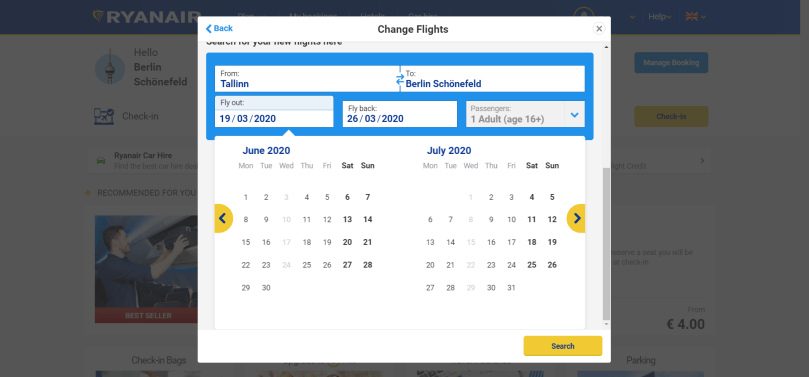
Furthermore, you may change both or either flight date and/or destination but as for the destination I cannot 100% guarantee if you can change because I changed only the flight dates. As mentioned earlier, since I had multiple flights for one trip on another airline (easyJet) too so I changed the flights between Tallinn and Berlin, taking into account the prices of another flight on Ryanair or on easyJet that I was also supposed to use.
7) Pay the difference
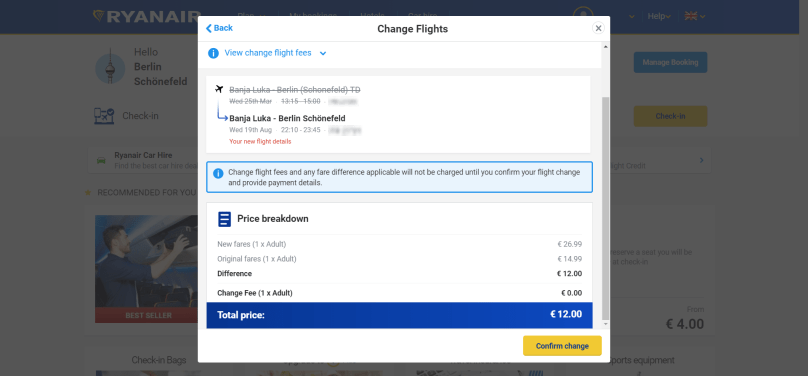
Once you decided the flights, the last thing you need to do is pay. Usually Ryanair charges you some as a change fee but I paid for the difference between the prices of the new flights and the flights that I was supposed to take without any change fee as said due to COVID-19.
It’s easy isn’t it?
It’s true that it was actually hard to rebook flights because I had multiples but I did the right thing on the previous night – to wait a bit longer until Ryanair announced something. It’s good to be patient.
Now I’m super looking forward to the trips in summer. Really.


 zooks.ee